
LetsGo2U Withdraw Balance and MYR Withdrawal Guide
LetsGo2U Withdraw Overview
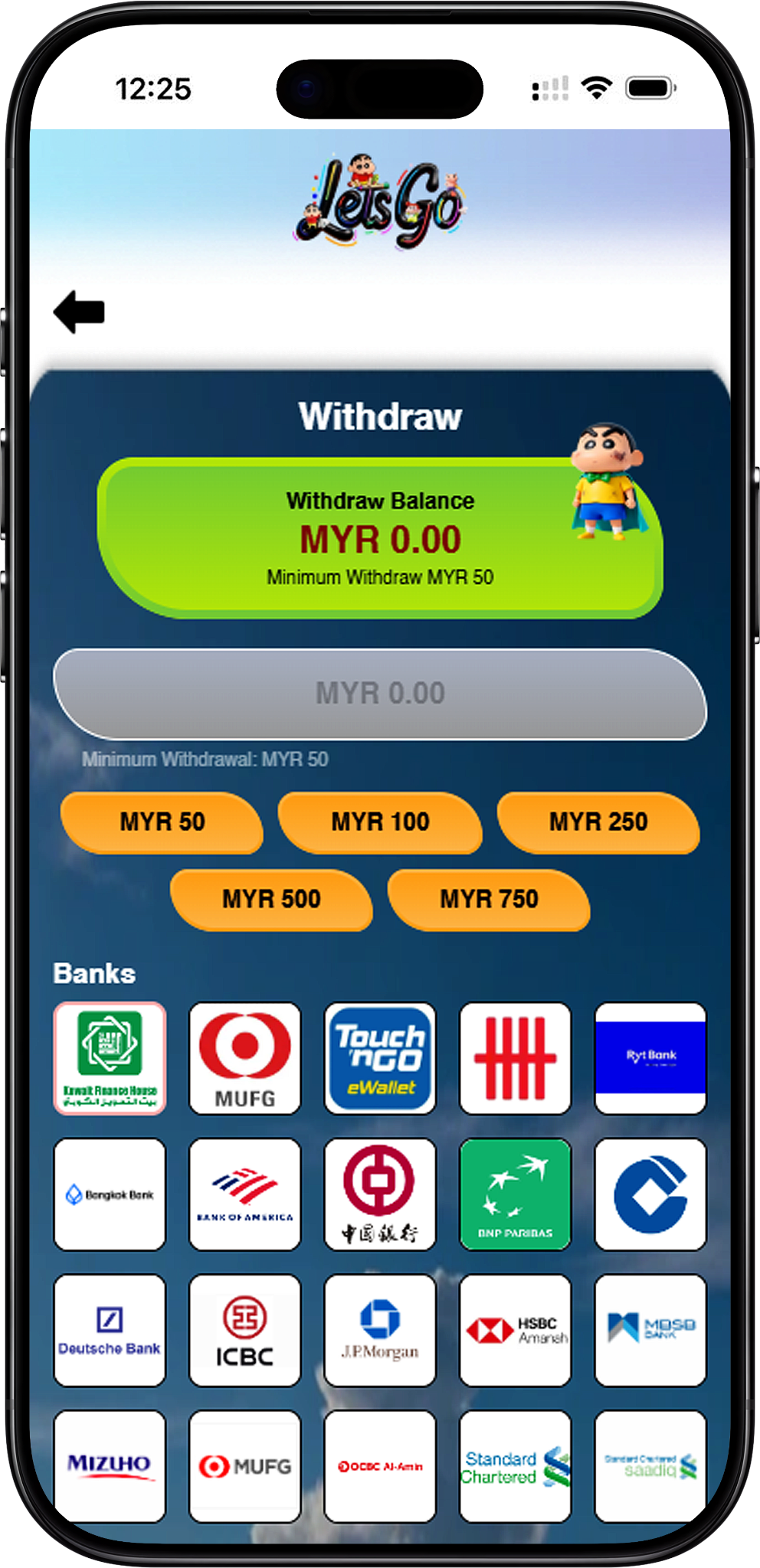
Check Your Available Withdraw Balance
The withdrawal page displays a Withdraw Balance before the request form. Users should check this amount first because the requested withdrawal should be based on the balance currently available to withdraw.
MYR Withdrawal Interface
The supplied interface uses MYR and provides an amount field, preset withdrawal amounts, supported bank selection, Account Number, Account Name, a six-position PIN Code section, and a Submit button. Users who need to fund their account can review Deposit (/en/deposit, internal link) separately from the withdrawal process.
Minimum Withdrawal and Amount Options
Minimum Withdrawal Is MYR 50
The supplied withdrawal page states “Minimum Withdraw MYR 50” and “Minimum Withdrawal: MYR 50.” A request should therefore meet the displayed MYR 50 minimum before submission.
Preset Withdrawal Amounts
The interface provides preset amount buttons for MYR 50, MYR 100, MYR 250, MYR 500, and MYR 750. An amount entry field is also displayed above these options. Users should select or enter an amount appropriate for their available withdraw balance.
Supported Withdrawal Banks
Select a Bank Before Entering Account Details
The supplied interface displays a broad selection of bank and payment options. Users should choose the institution that corresponds to the account they intend to use before entering their Account Number and Account Name.
Bank Options Shown on the Withdrawal Page
Examples visibly shown include Kuwait Finance House, MUFG, Touch ’n Go eWallet, Ryt Bank, Bangkok Bank, Bank of America, Bank of China, BNP Paribas, Deutsche Bank, ICBC, JPMorgan, HSBC Amanah, MBSB Bank, Mizuho, OCBC Al-Amin, Standard Chartered, Standard Chartered Saadiq, SMBC, AEON, ShopeePay, Agrobank, Alliance Bank, Al Rajhi Bank, AmBank, Bank Simpanan Nasional (BSN), CIMB, Citibank, Affin, OCBC Bank, RHB, UOB, BigPay, Boost Bank, Boost and GXBank, among other options displayed in the supplied interface. Availability should be confirmed directly on the current withdrawal page because payment options can change.
Account Information and PIN Verification
Account Number
The withdrawal form includes an Account Number field. Enter the account number associated with the selected withdrawal bank or supported payment account and check the digits carefully before proceeding.
Account Name
An Account Name field appears immediately after the Account Number field. Users should provide the requested account-holder information accurately to reduce the risk of submitting mismatched withdrawal details.
Six-Position PIN Code
The interface shows six PIN Code positions before the Submit button. Treat the PIN as private security information and enter it only through the withdrawal interface. Do not disclose a PIN in messages or to another person.
LetsGo2U Withdraw Steps
Step 1: Sign In to Your Account
Open Login (/en/login, internal link) and sign in to the account associated with the funds you want to withdraw. Users who do not yet have an account can review Register (/en/register, internal link) before attempting account transactions.
Step 2: Open the Withdraw Page
After signing in, select Withdraw (/en/withdraw, internal link) to access the withdrawal form. Check that the page displays your current Withdraw Balance before entering payment information.
Step 3: Check the Available Withdraw Balance
Review the displayed Withdraw Balance at the top of the interface. This helps you determine the amount available before preparing the withdrawal request.
Step 4: Enter or Select the Withdrawal Amount
Enter an amount in the withdrawal field or choose one of the displayed preset options: MYR 50, MYR 100, MYR 250, MYR 500, or MYR 750. The supplied interface states a minimum withdrawal of MYR 50.
Step 5: Select Your Bank
Choose the appropriate bank or supported payment option from the institutions displayed on the withdrawal page. Confirm your selection before continuing to the account information fields.
Step 6: Enter the Account Number
Type the Account Number for the selected bank or payment account. Review the number before proceeding because incorrect account details may affect the withdrawal request.
Step 7: Enter the Account Name
Complete the Account Name field with the requested account-holder information. Make sure the information corresponds with the account selected for the withdrawal.
Step 8: Enter the PIN Code
Enter your six-position PIN Code in the verification area shown on the form. Keep this code confidential and use it only to authorize your own request.
Step 9: Review and Submit
Check the withdrawal amount, selected bank, Account Number and Account Name before selecting Submit. You can start from https://letsgo2u.my/ and navigate through your account when you need to access the current transaction interface.
Before Submitting a Withdrawal
Confirm the Minimum Amount
Make sure the requested amount is at least MYR 50, which is the minimum shown in the supplied withdrawal interface.
Verify Your Bank Details
Review the selected institution, Account Number and Account Name carefully. The supplied screenshot does not state that incorrect banking information can be automatically corrected after submission.
Keep Your PIN Private
Never share the PIN used to authorize a withdrawal. It should be entered only through the appropriate account interface when you are submitting your own request.
Review Related Account Information
If you need to add funds rather than withdraw them, use Deposit (/en/deposit, internal link). You can also review Rebate (/en/rebate, internal link) for the supplied rebate information or Promotion (/en/promotion, internal link) for available promotional information.
Check Current Conditions
The supplied material confirms the visible MYR 50 minimum and form fields but does not provide a withdrawal processing time, withdrawal fee, daily limit, or guaranteed completion period. Users should rely on the current account interface for any additional conditions rather than assuming terms that are not displayed.
Frequently Asked Questions About LetsGo2U Withdraw
What is the minimum withdrawal amount?
The supplied interface shows a minimum withdrawal of MYR 50.
Which preset withdrawal amounts are available?
The visible preset options are MYR 50, MYR 100, MYR 250, MYR 500, and MYR 750.
What information is required for a withdrawal?
The supplied form shows a withdrawal amount, bank selection, Account Number, Account Name and six-position PIN Code before the Submit button.
Where can I check how much I can withdraw?
Check the Withdraw Balance displayed at the top of the withdrawal interface before choosing an amount.
Can I withdraw through a bank?
Yes. The supplied interface presents numerous banking and payment options for selection. The currently available institutions should be confirmed on the withdrawal page when making a request.
Does the page support Touch ’n Go eWallet?
Touch ’n Go eWallet is among the options visibly displayed in the supplied withdrawal interface. Current availability should still be confirmed when submitting a request.
Do I need a PIN Code?
Yes. The supplied withdrawal form displays a six-position PIN Code section before submission.
How long does a withdrawal take?
A processing time is not stated in the supplied material, so this page should not promise instant or fixed-time withdrawals. Check the current transaction status and applicable account information after submitting a request.
Are withdrawal fees shown?
No withdrawal fee is stated in the supplied screenshot. Users should check the current withdrawal interface for any applicable conditions before submitting.
What should I check before pressing Submit?
Verify the withdrawal amount, selected bank, Account Number, Account Name and PIN entry. Also confirm that the requested amount meets the displayed MYR 50 minimum.
Where can I browse other account features?
Visit Home (/en, internal link) for the main platform navigation, Games (/en/games, internal link) for available game categories, or Rebate (/en/rebate, internal link) for the supplied rebate programme information.
Make a LetsGo2U Withdrawal
Check your available balance, select an eligible MYR amount, verify your bank details and PIN, then submit the withdrawal request through your account.